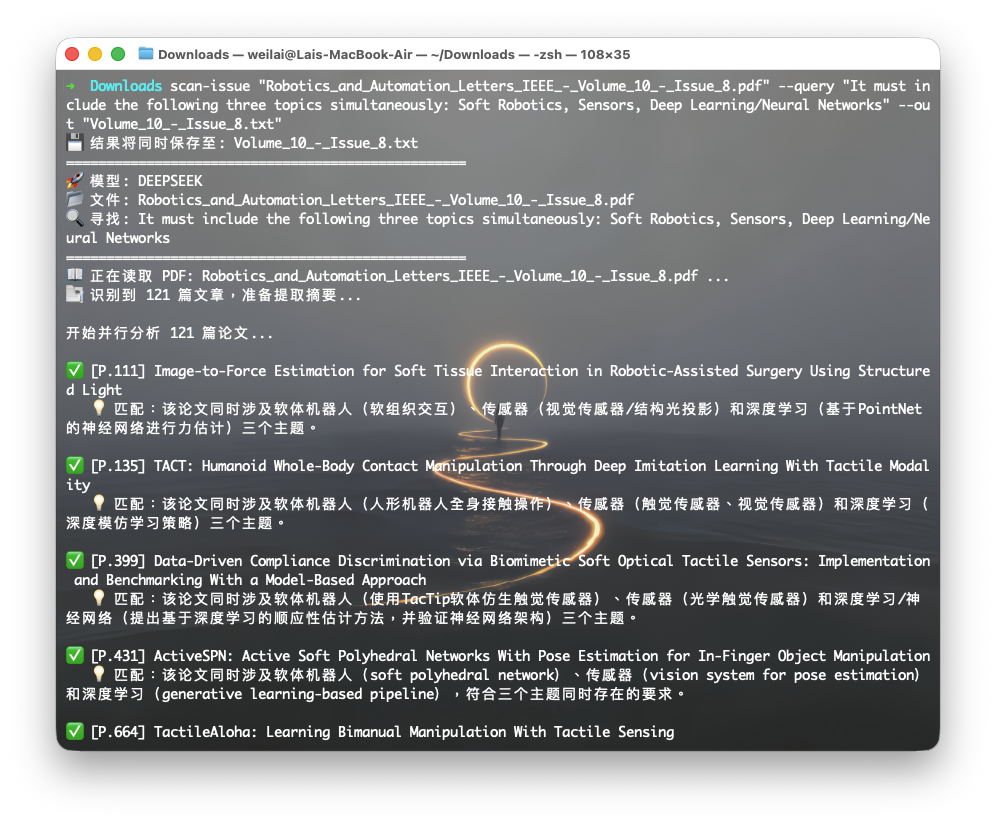
I recently encountered a problem: I downloaded a complete issue of IEEE RA-L (Robotics and Automation Letters), which is a massive PDF containing hundreds of papers.
I tried uploading it to NotebookLM, but it hit the 200MB file limit. I tried local RAG (AnythingLLM), but embedding the full text was slow and resource-intensive.
I realized I only needed to check the Title and Abstract to decide if a paper was relevant. So, I built a lightweight Python tool scan-issue using uv, PyMuPDF, and the DeepSeek API. It costs less than $0.01 to scan an entire journal issue.
Prerequisites
Ensure you have uv installed and your API keys configured (shared with my previous BabelDOC setup).
Install Dependencies
We need pymupdf (fitz) for fast PDF processing and openai for standard API calls.
mkdir -p ~/Tools/paper-scanner
cd ~/Tools/paper-scanner

# Initialize environment
uv init --python 3.12
uv add pymupdf openai
Configure API Keys
Ensure your ~/.zshrc has the following (reusing the setup from BabelDOC):
export DEEPSEEK_API_KEY="sk-xxxx"
export DEEPSEEK_BASE_URL="https://api.deepseek.com/v1"
export DEEPSEEK_MODEL="deepseek-chat"
# Optional: Qwen or Doubao keys...
The Core Script (scanner.py)
I created scanner.py in ~/Tools/paper-scanner/.
Key features:
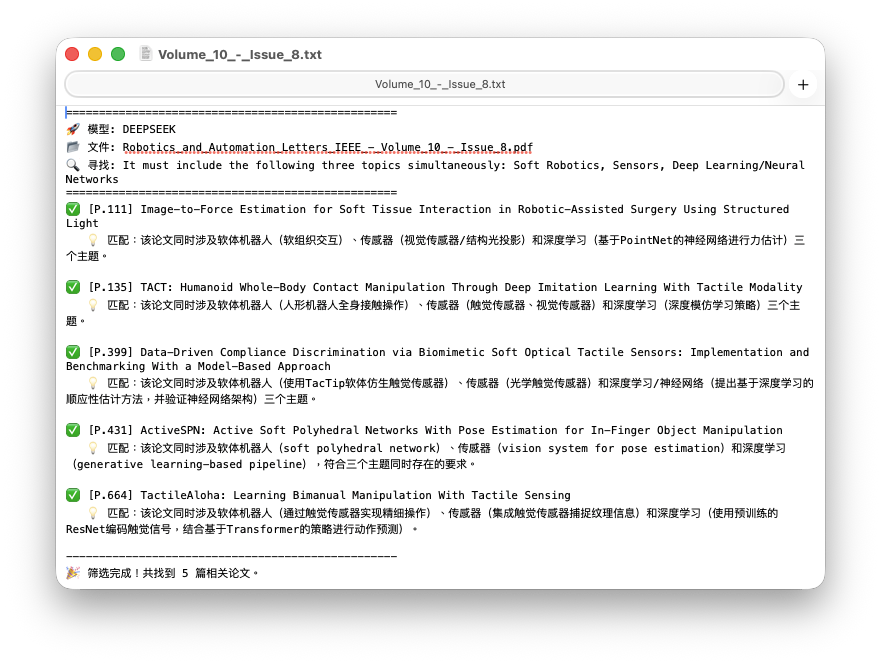
- Dual Logging: Prints to console with Emojis and simultaneously saves to a clean
.txtfile. - Concurrency: Uses
ThreadPoolExecutorto check 5 papers at once (very fast). - Smart Extraction: Uses the PDF Table of Contents to locate the first page of each paper automatically.
import os
import sys
import fitz  # PyMuPDF
import json
import argparse
from openai import OpenAI
from concurrent.futures import ThreadPoolExecutor

# --- 1. Config Loading ---
MODEL_CONFIG = {
    "deepseek": {
        "api_key": os.getenv("DEEPSEEK_API_KEY"),
        "base_url": os.getenv("DEEPSEEK_BASE_URL"),
        "model": os.getenv("DEEPSEEK_MODEL", "deepseek-chat")
    },
    "qwen": {
        "api_key": os.getenv("QWEN_API_KEY"),
        "base_url": os.getenv("QWEN_BASE_URL"),
        "model": os.getenv("QWEN_MODEL", "qwen-max")
    },
    "doubao": {
        "api_key": os.getenv("DOUBAO_API_KEY"),
        "base_url": os.getenv("DOUBAO_BASE_URL"),
        "model": os.getenv("DOUBAO_MODEL")
    }
}

# --- 2. Dual Logger ---
class DualLogger:
    def __init__(self, filepath=None):
        self.file = None
        if filepath:
            try:
                self.file = open(filepath, 'w', encoding='utf-8')
                print(f"💾 Results will be saved to: {filepath}")
            except Exception as e:
                print(f"⚠️ Failed to create output file: {e}")

    def log(self, message, end="\n", to_file=True):
        print(message, end=end, flush=True)
        if self.file and to_file:
            self.file.write(message + end)
            self.file.flush()

    def close(self):
        if self.file:
            self.file.close()

# --- 3. Core Functions ---
def get_client(model_name):
    config = MODEL_CONFIG.get(model_name)
    if not config or not config["api_key"]:
        print(f"❌ Error: Missing config for {model_name}")
        sys.exit(1)
    return OpenAI(api_key=config["api_key"], base_url=config["base_url"]), config["model"]

def extract_abstracts(pdf_path, logger):
    if not os.path.exists(pdf_path):
        logger.log(f"❌ File not found: {pdf_path}")
        sys.exit(1)

    logger.log(f"📖 Reading PDF: {os.path.basename(pdf_path)} ...", to_file=False)
    doc = fitz.open(pdf_path)
    toc = doc.get_toc(simple=True)

    start_pages = sorted(list(set([item[2] for item in toc if item[2] > 0])))
    if 1 not in start_pages: start_pages.insert(0, 1)

    papers = []
    logger.log(f"📑 Identified {len(start_pages)} papers. Extracting abstracts...", to_file=False)

    for i, page_num in enumerate(start_pages):
        try:
            # Extract first 2000 chars (Covering Title + Abstract)
            text = doc[page_num - 1].get_text()[:2000]
            papers.append({"id": i+1, "page": page_num, "text": text})
        except Exception:
            continue
    return papers

def analyze_paper(client, model_id, paper, keywords):
    prompt = f"""
    You are a research assistant. Read the following paper snippet (Title/Abstract).
    User is looking for papers related to: "{keywords}".

    Input Text:
    ---
    {paper['text']}
    ---

    Return strictly a JSON object:
    {{
        "title": "Paper Title",
        "is_relevant": true/false,
        "reason": "Brief reason in Chinese (Start with '匹配' or '不匹配')"
    }}
    """
    try:
        response = client.chat.completions.create(
            model=model_id,
            messages=[
                {"role": "system", "content": "You are a JSON parser helper."},
                {"role": "user", "content": prompt}
            ],
            temperature=0.1,
            response_format={"type": "json_object"}
        )
        result = json.loads(response.choices[0].message.content)
        return {**paper, **result}
    except Exception:
        return None

# --- 4. Main ---
def main():
    parser = argparse.ArgumentParser(description="AI Paper Scanner")
    parser.add_argument("pos_input", nargs="?", help="PDF Path")
    parser.add_argument("pos_query", nargs="?", help="Keywords")
    parser.add_argument("--in", "--input", dest="opt_input")
    parser.add_argument("--q", "--query", dest="opt_query")
    parser.add_argument("--out", "--output", dest="output_file")

    group = parser.add_mutually_exclusive_group()
    group.add_argument("--deepseek", action="store_true", default=True)
    group.add_argument("--qwen", action="store_true")
    group.add_argument("--doubao", action="store_true")

    args = parser.parse_args()
    pdf_path = args.opt_input or args.pos_input
    keywords = args.opt_query or args.pos_query
    logger = DualLogger(args.output_file)

    if not pdf_path or not keywords:
        logger.log("Usage: scan-issue issue.pdf 'Keywords' [--out result.txt]")
        sys.exit(1)

    selected_model = "deepseek"
    if args.qwen: selected_model = "qwen"
    if args.doubao: selected_model = "doubao"

    client, model_id = get_client(selected_model)

    logger.log("="*50)
    logger.log(f"🚀 Model: {selected_model.upper()}")
    logger.log(f"📂 File: {os.path.basename(pdf_path)}")
    logger.log(f"🔍 Keywords: {keywords}")
    logger.log("="*50)

    papers = extract_abstracts(pdf_path, logger)
    results = []

    logger.log(f"\nScanning {len(papers)} papers concurrently...\n", to_file=False)

    with ThreadPoolExecutor(max_workers=5) as executor:
        futures = [executor.submit(analyze_paper, client, model_id, p, keywords) for p in papers]
        for future in futures:
            res = future.result()
            if res and res.get('is_relevant'):
                msg = f"✅ [P.{res['page']}] {res['title']}\n   💡 {res['reason']}\n"
                logger.log(msg)
                results.append(res)

    logger.log("-"*50)
    logger.log(f"🎉 Done! Found {len(results)} relevant papers.")
    if args.output_file:
        print(f"💾 Saved to: {os.path.abspath(args.output_file)}")
    logger.close()

if __name__ == "__main__":
    main()
Create Command Line Function
To run this tool from anywhere without activating the virtual environment manually, we use the uv run absolute path trick.
Add this to ~/.zshrc:
function scan-issue() {
    # Directly call the python interpreter inside the .venv created by uv
    # This preserves the current working directory (CWD)
    ~/Tools/paper-scanner/.venv/bin/python ~/Tools/paper-scanner/scanner.py "$@"
}
Reload config: source ~/.zshrc
Usage
1. Quick Scan (Display only)
Scan a full issue for “Soft Robotics” and “Sensors”.
scan-issue RA-L_Issue_1.pdf "Soft Robotics, Sensors"
2. Save Results to File
Ideal for generating a reading list.
scan-issue RA-L_Issue_1.pdf "Deep Learning" --out reading_list.txt
3. Switch Models
If DeepSeek is busy, force use Qwen or Doubao.
scan-issue RA-L_Issue_1.pdf "SLAM" --qwen --out slam_papers.txt